Phishing & Scams
Your 3-Step Guide to Mastering Anti-Phishing
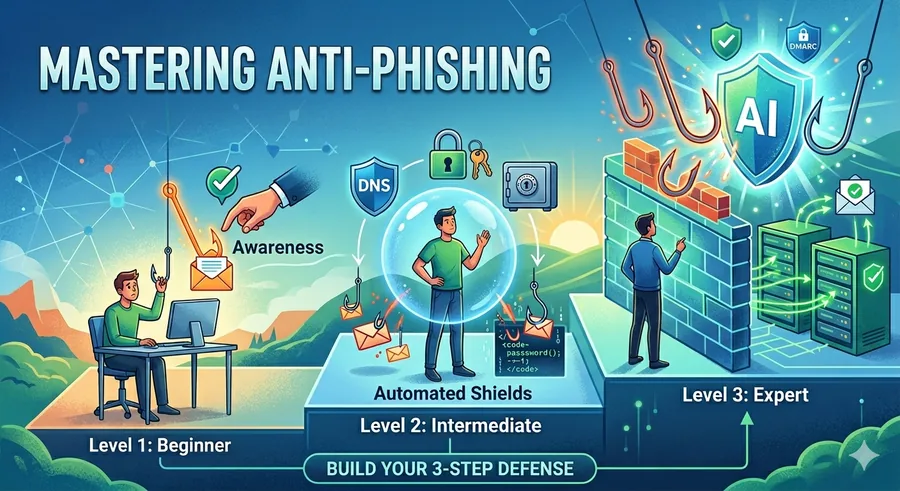
If you’re tired of feeling like a target, it’s time to build your defense. Here is the roadmap to moving from a digital target to a cybersecurity pro.
Phase 1: The "Human Firewall" (Beginner)
Total cost: $0 | Effort: Awareness
Before you buy software, you need to sharpen your instincts. At this level, you are the primary defense.
The "Hover" Test: Never click blindly. Hover your mouse over any link to see the real destination URL in the corner of your browser. If it says secure-bank-login.net instead of bank.com, it’s a trap.
The MFA Safety Net: Multi-Factor Authentication is your best friend. Even if a phisher steals your password, they can’t get past a physical security key or an authenticator app code.
Browser Sentinels: Ensure Google Safe Browsing or Microsoft SmartScreen is toggled 'ON' in your settings. These act as a real-time blacklist for known malicious sites.
Phase 2: Proactive Tech Shields (Intermediate)
Total cost: Low | Effort: Tool Setup
Now, we add automation. These services work in the background so you don't have to be "on" 24/7.
Smart DNS Filtering: Services like NextDNS or Cloudflare 1.1.1.1 act like a gatekeeper. If you accidentally click a malicious link, the DNS service refuses to load the page because it recognizes the site as a threat.
Password Managers: Beyond storing passwords, tools like Bitwarden or 1Password provide a hidden anti-phishing feature: they won't auto-fill on a fake site. If the URL is off by even one letter, the manager stays locked, alerting you to the scam.
Inbox Enhancers: Use third-party extensions that add "Trust Indicators" to your email, highlighting verified senders so you can distinguish your actual bank from an impostor.
Phase 3: The Enterprise Fortress (Expert)
Total cost: Variable | Effort: Technical Configuration
For business owners and tech enthusiasts, this level involves verifying the "identity" of the internet itself.
The Email Trinity (SPF, DKIM, & DMARC): These are digital "passports" for your domain. They tell the world, "If an email claiming to be from me doesn't have my digital signature, delete it immediately." This prevents hackers from "spoofing" your identity to trick others.
AI-Driven Inspection: Advanced services use Natural Language Processing (NLP) to scan for "urgency cues." They can detect if an email sounds like a CEO asking for a wire transfer and flag it as a "Business Email Compromise" (BEC) risk.
Sandboxing: Expert-level gateways use Link Detonation. When an email arrives, the service opens the link in a virtual "isolated room" first to see if it behaves maliciously before letting it reach your inbox.
Final Thought from PhishPin.com
Phishing relies on a split-second lapse in judgment. By layering these services, you create a "defense-in-depth" strategy that catches what the human eye misses.