Vulnerability Research
The Zero Trust Revolution: Why Your Password Isn't Enough Anymore
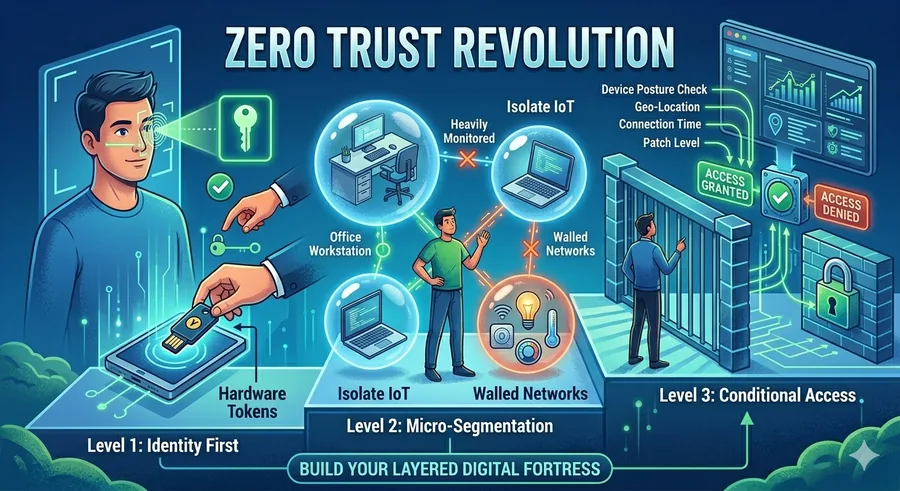
Enter Zero Trust. The philosophy is simple: Never trust, always verify. Here is your three-step roadmap to adopting a Zero Trust mindset.
Phase 1: Identity First (Beginner)
Total cost: $0 | Effort: Habit Change
In a Zero Trust world, your identity is the new perimeter. You must prove who you are every single time you access a service.
Kill the "Master" Password: Using one password for everything is a single point of failure. If one site is breached, your entire life is open.
Hardware Tokens: Move beyond SMS codes. Use physical keys like a YubiKey or biometric prompts (FaceID/Fingerprint). These are significantly harder to intercept or spoof.
The "Least Privilege" Rule: Don't browse the web or install software using an "Admin" account on your computer. Use a standard user account and only provide "Admin" permission when absolutely necessary.
Phase 2: Micro-Segmentation (Intermediate)
Total cost: Moderate | Effort: Network Tweaks
Don't let one infected device ruin your whole network. This level is about "walling off" different parts of your digital life.
Guest Networks: Your "smart" lightbulb or cheap Wi-Fi camera likely has terrible security. Put all IoT devices on a separate Guest Wi-Fi so they can't "see" your laptop or phone where your sensitive data lives.
App Permissions Audit: Go through your phone and revoke permissions. Does that calculator app really need access to your contacts and location? If it doesn't need it to function, shut it down.
Encrypted Tunnels: Use a modern VPN or a WireGuard setup when on public Wi-Fi. Treat every connection—even your home network—as if it were a public coffee shop.
Phase 3: Conditional Access (Expert)
Total cost: Enterprise Scale | Effort: Policy Logic
The expert level uses "Contextual Awareness" to grant access. It’s not just about who you are, but how you are connecting.
Contextual Verification: A Zero Trust service (like Cloudflare One or Google BeyondCorp) looks at your "posture." It asks: Is your antivirus updated? Are you connecting from a known country? Is it a recognized device? If any answer is "No," access is denied—even with the right password.
Just-In-Time (JIT) Access: Instead of having permanent access to a database, experts use services that grant "temporary" keys that expire after an hour.
Continuous Monitoring: Traditional security checks once at login. Zero Trust checks constantly. If your device suddenly starts behaving like a botnet while you're logged in, the session is killed instantly.
Final Thought From PhishPin.com
Zero Trust isn't a single product you buy; it's a way of thinking. By assuming that a breach is always possible, you build layers that make it nearly impossible for a hacker to move from one room to the next.